WordPress & WooCommerce video
VideographyWP Features
One plugin to import videos and put them anywhere on WordPress — from a post’s featured media to the WooCommerce product gallery.
Everything in one plugin
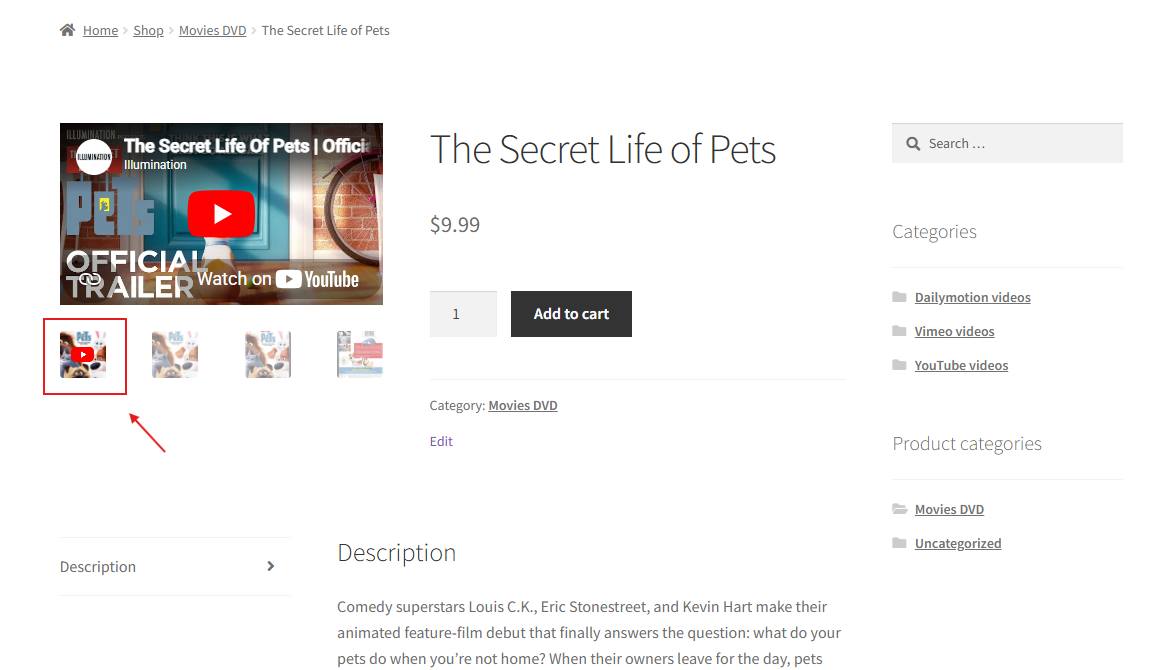
WooCommerce product video
Add video inside the product gallery, without replacing it. PRO.
WordPress featured video
Replace the featured image with a video on any post type.
YouTube video importer
Import title, description, image and date from the video URL.
Elementor video widget
Output videos in Elementor designs and templates.
WordPress video lightbox
Open videos in a lightbox with the video button.
Block & Classic editor
Works in both the Block editor and the Classic editor.
Import from any source
Paste a URL and VideographyWP pulls in the video with its title, description, thumbnail and publish date.
YouTube
Videos, Shorts and playlists — available in the free plugin.
Vimeo
Public and private videos, via a personal access token. PRO.
Dailymotion
Embed Dailymotion videos anywhere, including the product gallery. PRO.
See it in action
The flagship feature: video inside the WooCommerce product gallery, playing inline next to your product images.
Works anywhere you edit
Block editor
A video meta box on every post, page and product in Gutenberg.
Classic editor
The same controls if you still use the Classic editor.
Elementor
A dedicated video widget, plus featured-image replacement in templates.
WooCommerce
Video inside the product gallery on 20+ premium themes. PRO.
Free vs PRO
VideographyWP (free)
- YouTube featured video on posts & pages
- Auto-fill title, content & featured image
- Block & Classic editor
- Video lightbox button
VideographyWP PRO
- Video in the WooCommerce product gallery
- Vimeo (incl. private) & Dailymotion
- Elementor video widget & templates
- 20+ premium theme compatibilities
Put video everywhere on your site
Start free, upgrade when you need the WooCommerce product gallery. 30-day money-back guarantee.