Docs /
Videos for product variations
Show a product video in the gallery of variable WooCommerce products, so shoppers see it whichever variation they pick.
On variable products (products with options such as colour or size), VideographyWP PRO adds your video to the product gallery just as it does on simple products — so the video is available on the single product page alongside the variation images.
How to set it up
- Edit the variable product and set its attributes and variations as usual.
- In the VideographyWP box, paste the video URL and query it.
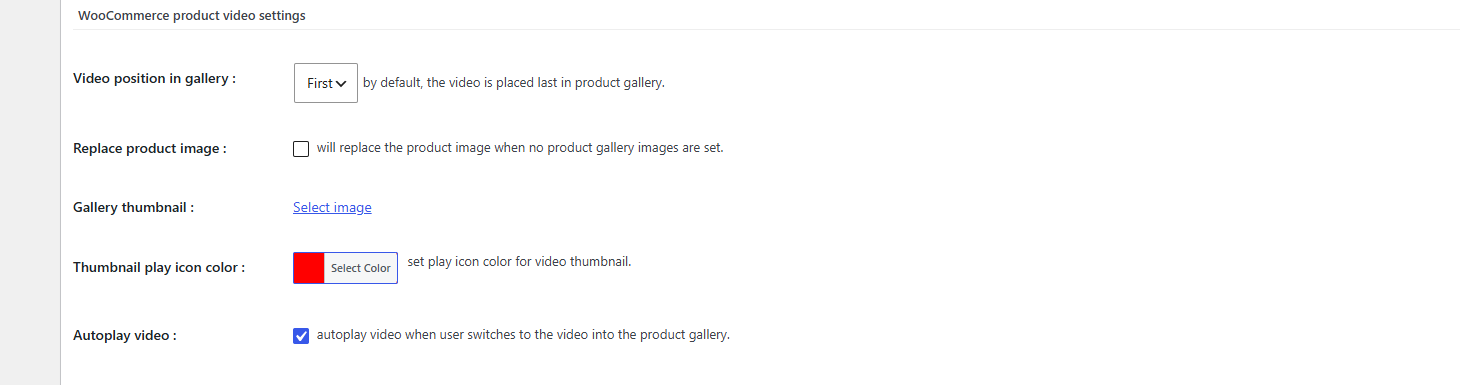
- Open WooCommerce product video settings and choose the gallery position, thumbnail, play-icon colour and autoplay.
- Update the product.
Tips
- Set Video position in gallery to First if you want the video to lead the gallery for every variation.
- Use a branded gallery thumbnail so the video tile matches your product photography.
Learn more on the WooCommerce product video page.